Matt Way Media
Single Take Teleprompter app icon
iPhone and iPadPhoto & Video

Single Take Teleprompter

You speak. Your script follows.

Single Take Teleprompter follows your voice as you speak, so you can read a script naturally and keep your eyes near the lens while recording on iPhone and iPad.

Free for up to five scripts. Single Take Premium is a one-time purchase.

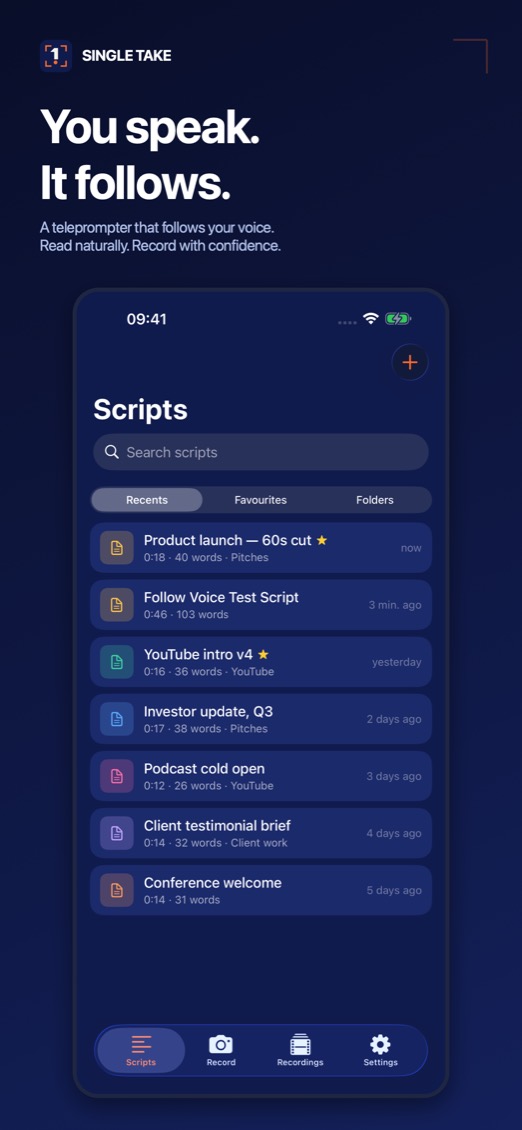
Single Take scripts list with a starred script at the top
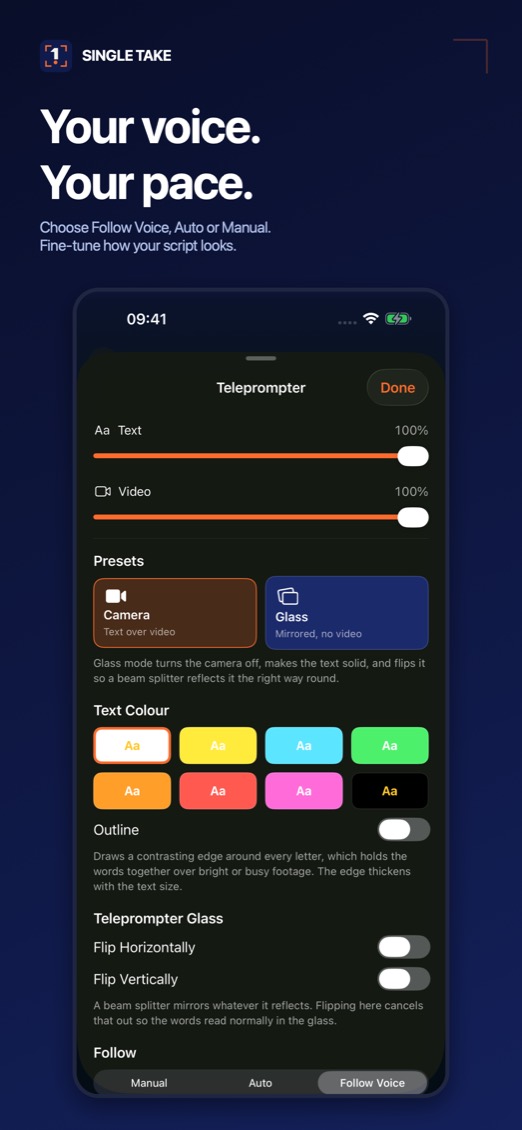
Teleprompter settings with text size, colour and the Follow Voice, Auto and Manual modes
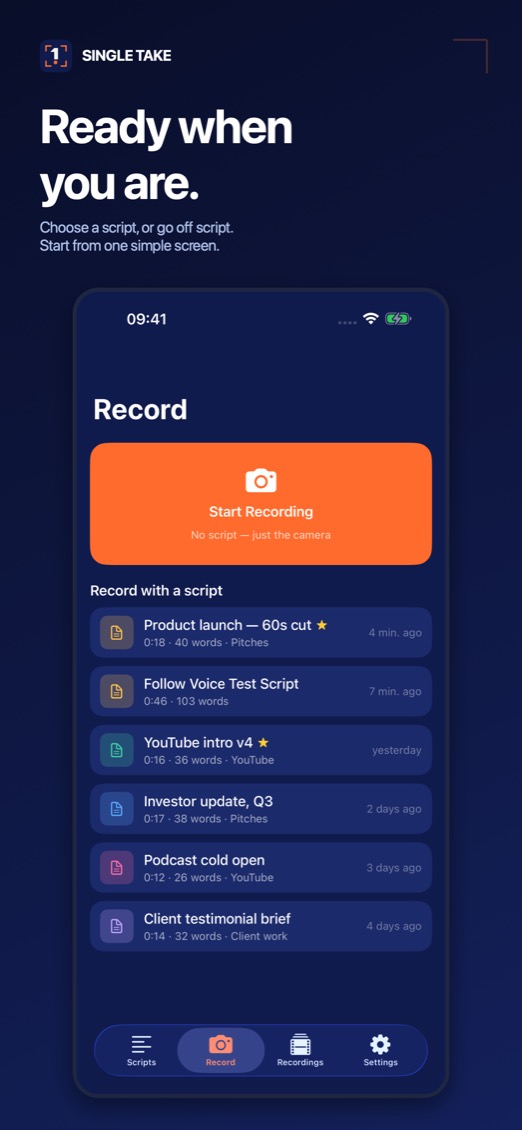
Record tab with a Start Recording button above a list of scripts

Overview

You speak. Your script follows.

Write or paste a script, import PDF, text, and RTF documents, or share text in from another app. Organise scripts with folders and favourites, see an estimated reading time as you write, then choose Manual, Auto, or Follow Voice scrolling. Text size, colour, opacity, and outline are adjustable, and mirroring supports a teleprompter glass rig.

Read over the camera preview while recording clean video without the prompter text burned in, pause and resume a take, and keep recordings together for playback and sharing. No account is required and nothing is uploaded. The free version includes up to five scripts and a banner advert, and a one-time Single Take Premium purchase unlocks unlimited scripts and removes advertising.

Released
15 September 2026
Category
Photo & Video
Works on
iPhone and iPad
Price
Free, with Premium
Account
None needed

A teleprompter that follows your voice

Single Take follows your voice as you speak, so you can read a script naturally and keep your eyes near the lens while recording on iPhone and iPad. Choose Follow Voice, Auto or Manual scrolling.

  • Follow Voice scrolling using on-device speech recognition
  • Manual and Auto scrolling whenever voice following is unavailable
Teleprompter settings with text size, colour and the Follow Voice, Auto and Manual modes

Write, paste or import your script

Write or paste a script, import PDF, text and RTF documents, or share text in from another app. Organise scripts with folders and favourites, and see an estimated reading time as you write.

  • Folders, favourites and estimated reading time
  • PDF, text and RTF import, plus a share extension
Single Take scripts list with a starred script at the top
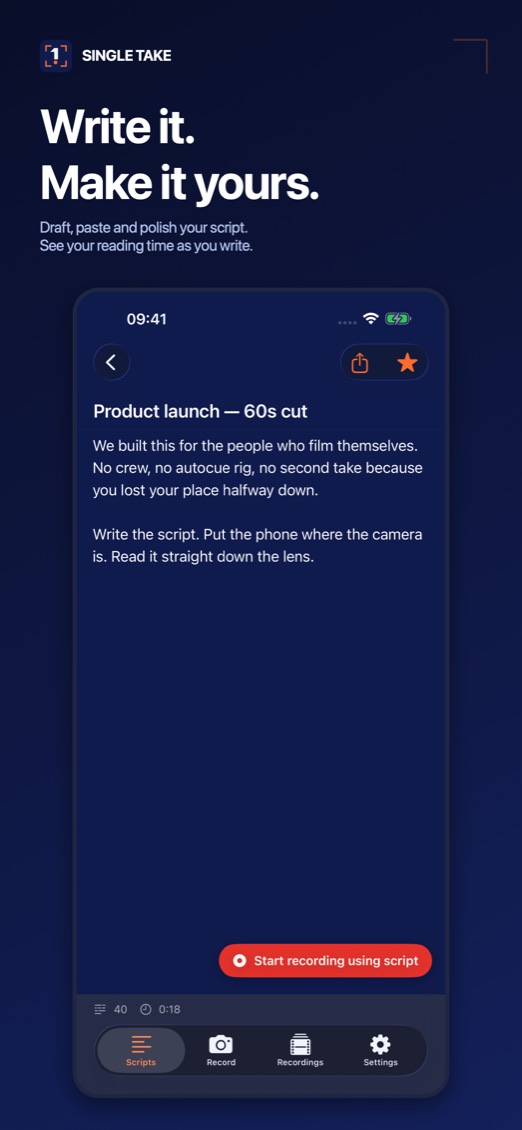
Script editor with a reading-time estimate and a start recording button

Record clean video, keep every take

Read over the camera preview while recording clean video without the prompter text burned in. Pause and resume a take, and keep recordings together for playback and sharing.

  • Pause and resume takes, then play back and share
  • Save recordings in the app, in Photos, or both
Record tab with a Start Recording button above a list of scripts
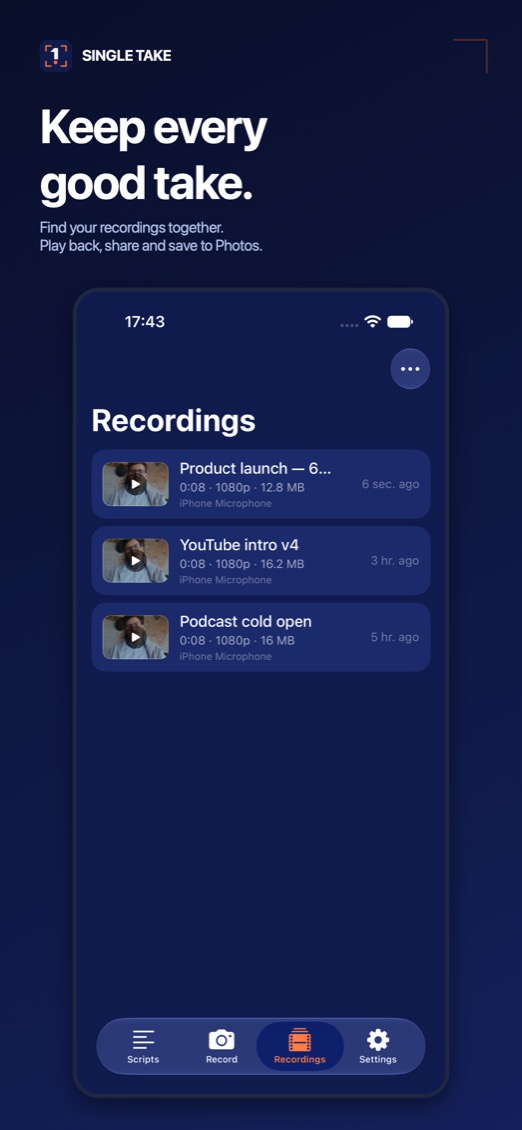
Recordings list with three takes, each with a thumbnail, duration and resolution

Your setup, remembered

Text size, colour, opacity and outline are adjustable, and mirroring supports a teleprompter glass rig.

  • Adjustable text size, colour, opacity, outline and mirroring
  • No account required and nothing is uploaded
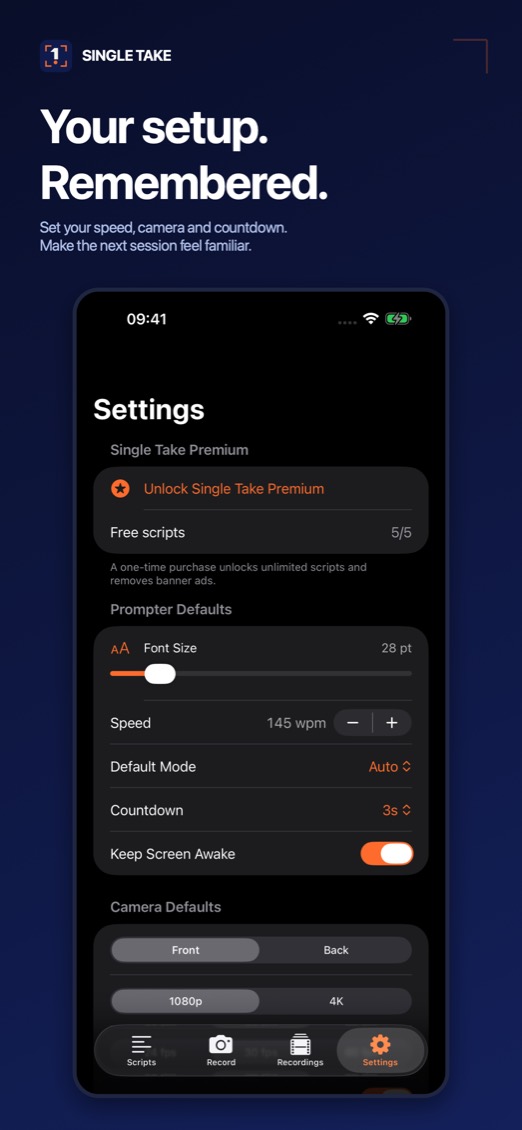
Settings with prompter defaults for font size, speed, mode and countdown, and camera defaults

Screenshots

Single Take on iPhone and iPad

Single Take scripts list with a starred script at the top
You speak. It follows.
Script editor with a reading-time estimate and a start recording button
Write it. Make it yours.
Teleprompter settings with text size, colour and the Follow Voice, Auto and Manual modes
Your voice. Your pace.
Record tab with a Start Recording button above a list of scripts
Ready when you are.
Recordings list with three takes, each with a thumbnail, duration and resolution
Keep every good take.
Settings with prompter defaults for font size, speed, mode and countdown, and camera defaults
Your setup. Remembered.
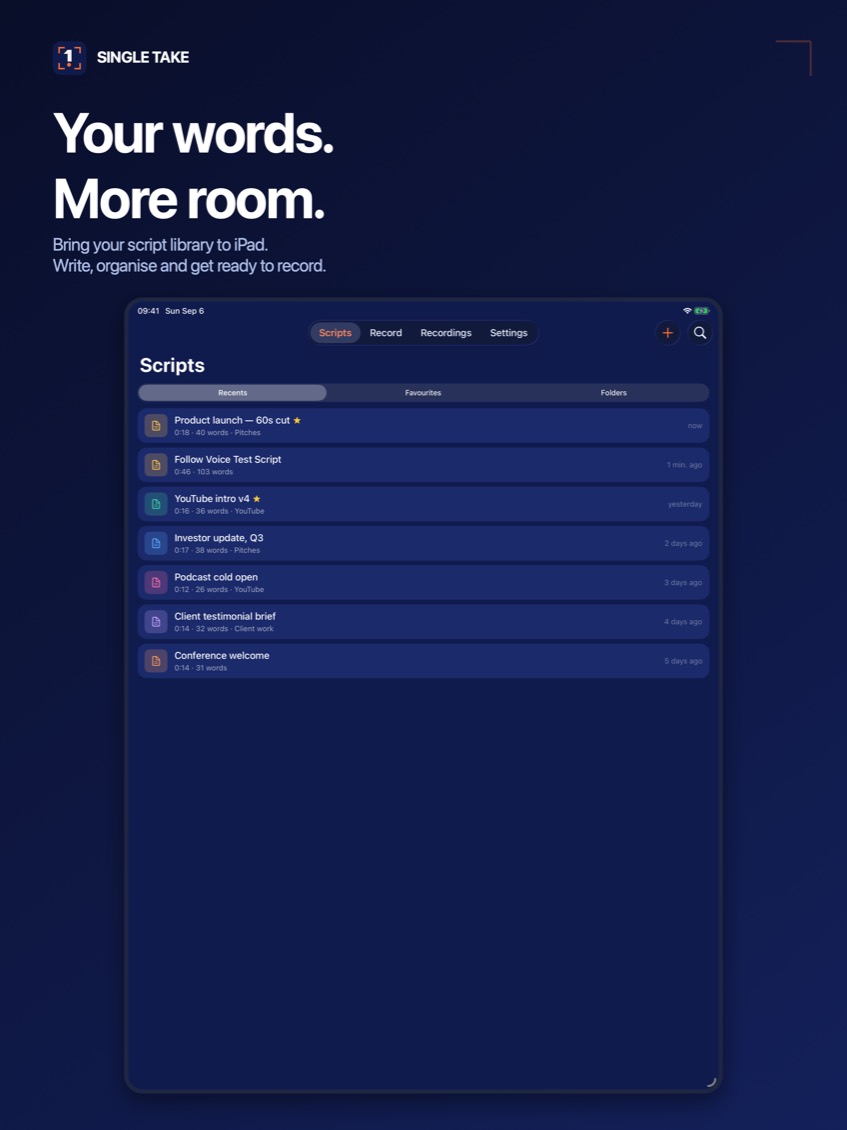
Single Take scripts list on an iPad
More room on iPad

Features

What is in it

  • Follow Voice scrolling using on-device speech recognition.
  • Manual and Auto scrolling whenever voice following is unavailable.
  • Script writing with folders, favourites, and estimated reading time.
  • PDF, text, and RTF import, plus a share extension for text from other apps.
  • Adjustable text size, colour, opacity, outline, and mirroring.
  • Video recording over the prompter, without the text burned into the video.
  • Pause and resume takes, then play back and share the results.
  • Save recordings in the app, in Photos, or both.
  • One-time Premium purchase for unlimited scripts and no adverts.

Guide

How to use a teleprompter on iPhone and keep eye contact

Reading from a script while looking at the lens is the hard part of recording yourself. A prompter that scrolls with your voice removes most of the guesswork.

  1. Get your script in

    Write or paste it, import a PDF, text or RTF file, or share text from another app.

  2. Pick how it scrolls

    Follow Voice matches what you say to the script using on-device speech recognition. Auto and Manual are there if you prefer them.

  3. Set up the text

    Adjust text size, colour, opacity and outline, and turn on mirroring if you are using a glass rig.

  4. Record over the camera preview

    The prompter sits over the preview, but the recorded video is clean, without the text burned in.

  5. Keep or share the best take

    Pause and resume as needed, then play back, share, or save to Photos.

Follow Voice uses Apple's speech recognition on your device. Transcripts are not sent to Matt Way Media.

Pricing

Free to start.

Free

£0

  • Up to five scripts
  • A banner advert
  • Follow Voice, Auto and Manual scrolling

Single Take Premium

One-time purchase

  • Unlimited scripts
  • Removes advertising

Questions

Good to know

How does Follow Voice work?

Follow Voice uses Apple's Speech framework with on-device recognition and matches recognised words against your script. There is no server-based recognition, and transcripts are not sent to Matt Way Media or to Google.

Is the prompter text in my video?

No. You read over the camera preview while recording clean video without the prompter text burned in.

Is Single Take free?

The free version includes up to five scripts and a banner advert. A one-time Single Take Premium purchase unlocks unlimited scripts and removes advertising.

Do I need an account?

No. No account is required and nothing is uploaded.

Which script files can I import?

PDF, text and RTF documents, and you can share text in from another app.

Privacy

Privacy policy

A plain-English summary of what Single Take does with your information. The full policy is linked below.

Developer data collection

Matt Way Media does not operate an account system, cloud storage service, analytics server, or advertising database for Single Take. The developer does not receive your scripts, imported documents, recordings, or speech transcripts. Google and Apple may process limited information through their advertising, platform, and purchase services as described below.

Scripts and recordings

Scripts, folders, preferences, recording files, and recording details are stored in the app's private storage on your device and are not uploaded by the app. You choose what to export or share, recording backup can be turned off in Single Take Settings, and Apple device backups or iCloud Photos may hold copies according to your own Apple settings.

Voice following

Follow Voice uses Apple's Speech framework with on-device recognition and matches recognised words against your script. There is no server-based recognition, and transcripts are not sent to Matt Way Media or to Google. Auto and Manual scrolling remain available when on-device recognition is unavailable for your device or language.

Permissions

Camera and microphone access are used for video recording, speech-recognition permission enables Follow Voice, and add-only Photos access is requested when you choose to save a recording to Photos. The app does not read your photo library. You can decline or change any permission in iOS Settings, and features that need it then stay unavailable.

Advertising

The free version uses Google AdMob for a banner advert and Google's User Messaging Platform for consent. Google and its advertising partners may process device identifiers, IP-derived coarse location, advertising data, product interactions, crash data, and performance data for advertising, analytics, and operating the consent service. Scripts, recordings, and transcripts are not sent to these services.

Tracking and consent

Single Take resolves Apple's App Tracking Transparency decision before adverts are requested, and Google's consent form is shown where its configured regional messages require it. You can decline tracking and keep using the app. Tracking permission can be changed in iOS Settings, and Ad Privacy Choices appears in Single Take Settings when Google requires that control.

Purchases

Single Take Premium is a one-time, non-consumable purchase handled by Apple through StoreKit. It removes banner adverts and unlocks unlimited scripts. Matt Way Media does not receive your payment-card details; the app reads verified product and entitlement information to deliver the purchase and to restore it.

Accounts, retention, and deletion

No Matt Way Media account is required. Delete scripts and recordings in the app, or delete the app, to remove its local content. Copies you exported, saved to Photos, or included in a device backup must be managed separately. Advertising and consent information is retained by Google under its own policies. For privacy or support questions, email [email protected].

Last updated 1 October 2026Read the full privacy policy →

Support

Need a hand with Single Take?

Send me a message here and I'll reply by email.

Contact support →

More from Matt Way Media

Tiny Swords : Last StandPhoto Jigsaw: Puzzle MakerCard Score ScannerReflect Mindfulness JournalRace Pace - Run CalculatorSaturday 5K Predictor for Garmin
All apps →